 blog
blog
Best Encrypted Group Video Calls: A 2026 Guide
Table of Contents
- What Makes Group Video Calls Truly Encrypted
- End-to-End Encrypted Video Calls: How to Verify the Claim
- Secure Video Conferencing Platforms: Group Limits and Trade-Offs Compared
- Metadata, Retention, and Data Residency: The Privacy Details Most Apps Hide
- Video Conferencing Security Best Practices for Group Calls
- Choosing the Best Encrypted Group Video Calls for Your Threat Model
- Conclusion
- Frequently Asked Questions
Last Updated: October 14, 2026
What Makes Group Video Calls Truly Encrypted
Not every app that says "encrypted" protects your group video calls the same way.
End-to-end encryption is the standard that matters here: the call is scrambled on your device and unscrambled only on your participants' devices.
This guide from Yonora breaks down what actually protects a group call, how to verify a provider's claims, and the trade-offs at each group size.
What End-to-End Encryption Actually Protects in a Group Call
In a group call, end-to-end encryption protects the live audio and video streams between every participant. Each device negotiates its own encryption keys, so a ten-person call has many separate encrypted channels, not one shared pipe.
Here is what end-to-end encryption does not automatically cover.
- Metadata. Who called whom, when, and for how long is often visible to the provider even when the content is not.
- Group membership changes. When someone joins or leaves, the app must renegotiate keys. A poorly built system can leave a window where the wrong device holds a key.
- Server-side features. Cloud recording, live transcription, and some AI tools require the server to read the stream, which breaks end-to-end protection for that feature.
So "encrypted group video calls" is a claim about the content stream first. Everything else needs its own answer.
End-to-End Encrypted Video Calls: How to Verify the Claim
A provider's marketing page is not proof. Verification means checking who audited the claim and whether you can confirm it yourself.
Independent verification is the strongest signal. Look for a published security audit from a named third-party firm, with scope and date stated.
Then check what you can confirm on your own device:
- Safety numbers or key fingerprints. Most serious apps let two users compare a short code. If the codes match, no one is sitting in the middle.
- Open source. When the client code is public, outside researchers can inspect the encryption protocol rather than trust a description of it.
- A published privacy policy that names what is collected, what is retained, and for how long.
The Signal Protocol specification is a useful reference point for how modern key exchange is documented, even though we do not recommend or link to competing apps here.
Secure Video Conferencing Platforms: Group Limits and Trade-Offs Compared
Group size is where privacy claims meet real-world limits. Most roundups stop at a participant cap; the real question is what happens to encryption when the group grows?
Here is the pattern, based on how modern group-call protocols work:
- Small groups (2-8 people): Full end-to-end encryption is practical. Each device negotiates its own keys, and the provider never sees the raw media. Key verification (safety numbers) is usually available.
- Medium groups (9-23 people): End-to-end encryption is still possible, but key management becomes heavier. Some apps switch to a server-assisted model where the server distributes keys but cannot decrypt media. Others keep pure peer-to-peer encryption but suffer on low-end devices.
- Large groups (24+ people): True end-to-end encryption becomes rare. Most providers fall back to "encrypted in transit" (TLS between each participant and the server), which means the server can theoretically access the stream. This is an engineering trade-off for stability, not a conspiracy.
What You Actually Trade Off at Each Tier
Group Size | Typical Encryption Status | What You Give Up |
|---|---|---|
2 people | Full end-to-end, keys verifiable | Nothing meaningful |
3-8 people | End-to-end, per-device keys | Slightly longer join time as keys are exchanged |
9-23 people | End-to-end on most apps, but server-assisted key distribution is common | Higher bandwidth, weaker low-end device support, occasional join delays |
24+ people | Often server-assisted or "encrypted in transit" | End-to-end frequently dropped for scale; recording and transcription may become server-side |
The key takeaway: the "encrypted" label on a 50-person webinar rarely means the same as on a 5-person family call. Above 23 people, assume the provider can access the stream unless it explicitly states otherwise and backs that claim with an audit.
How to Test Before You Commit
- Check the provider's documentation for the exact group size where end-to-end encryption stops. Many apps bury this in a support article.
- Run a test call with the oldest phone in your group. Key negotiation and bandwidth demands hit low-end devices first.
- Look for a visible indicator during the call, a lock icon or a "verify" button, that confirms end-to-end encryption is active for that specific session.
A Note on Recording and Transcription
Cloud recording and live transcription are server-side features: enabling them forces the server to read the stream, breaking end-to-end protection for that feature. Some apps offer local recording that preserves encryption, but it is less common. Always check whether recording is processed locally or in the cloud.
Group Call Limits Beyond Participant Count
Participant caps are only one limit. Also consider:
- Call duration limits: Free tiers often cap group calls at 40 minutes or 60 minutes. Paid tiers remove this.
- Screen sharing: Some apps restrict screen sharing to the host or to paid plans.
- Dial-in options: Phone dial-in usually bypasses end-to-end encryption because the phone network cannot support it.
These limits matter as much as encryption: a tool with perfect encryption that drops your call after 40 minutes is not practical for a long team meeting.
Metadata, Retention, and Data Residency: The Privacy Details Most Apps Hide
Content encryption gets the headlines, but metadata, retention, and data residency decide what a provider can still learn and store, the gap most encryption roundups ignore.
What Metadata Reveals Even When Content Is Encrypted
Metadata is the trail around the call: who joined, from which IP, when, for how long, and on what device. A provider that encrypts content but logs metadata still holds a detailed map of your group's behavior.
Common metadata points include:
- Call logs: Who called whom, when, and duration. Often retained even if the content is not.
- IP addresses: Reveal approximate location and can be used to infer relationships.
- Device identifiers: Model, OS version, and unique advertising IDs.
Some apps minimize metadata collection; others treat it as a business asset. The privacy policy states this, but you often need to read the "data we collect" and "how long we keep it" sections separately.
Retention: How Long Is Your Data Kept?
Retention periods vary widely. A common pattern is:
- Call logs: Deleted after 30-90 days on privacy-focused apps; kept indefinitely on ad-supported platforms.
- Account data: Retained until you delete your account, plus a grace period (often 30 days).
- Backups: Encrypted backups may be kept for disaster recovery, sometimes for months.
Look for a clear statement like "we delete call logs after 30 days" rather than vague language like "we retain data as long as necessary," which gives the provider broad discretion.
Data Residency: Where Your Data Physically Sits
Data residency is where data is stored and processed. For users in India, Pakistan, Bangladesh, the Gulf, the UK, or Canada, the hosting country affects which laws can compel access.
- European Union: GDPR imposes strict rules on data transfers outside the EU (International data transfers | Data protection guide for small business). The European Data Protection Board guidance on data transfers explains why residency matters for cross-border calls.
- India: The Digital Personal Data Protection Act (DPDP Act) 2023 introduces data localization requirements for certain categories of data.
- Gulf countries: Some require data to be stored within national borders for government or financial sectors.
A provider that publishes its server locations is easier to assess. If it does not state where data is processed, assume it could be anywhere.
How to Assess a Provider's Metadata and Retention Practices
- Read the privacy policy's "data retention" section. Look for specific timeframes.
- Check for a transparency report. Some providers publish how often they receive government requests and how they respond.
- Look for a data processing agreement (DPA). This is common for business plans and states where data is processed.
- Test account deletion. See if the app actually deletes your data or just deactivates the account.
The Unique Angle: Metadata as a Threat Vector
For journalists, activists, and anyone facing targeted surveillance, metadata can be as dangerous as content: who called whom and when can reveal sources, locations, and relationships. If your threat model includes a determined adversary, prioritize apps that minimize metadata collection, offer anonymous sign-up (no phone number required), and publish transparency reports.
Video Conferencing Security Best Practices for Group Calls
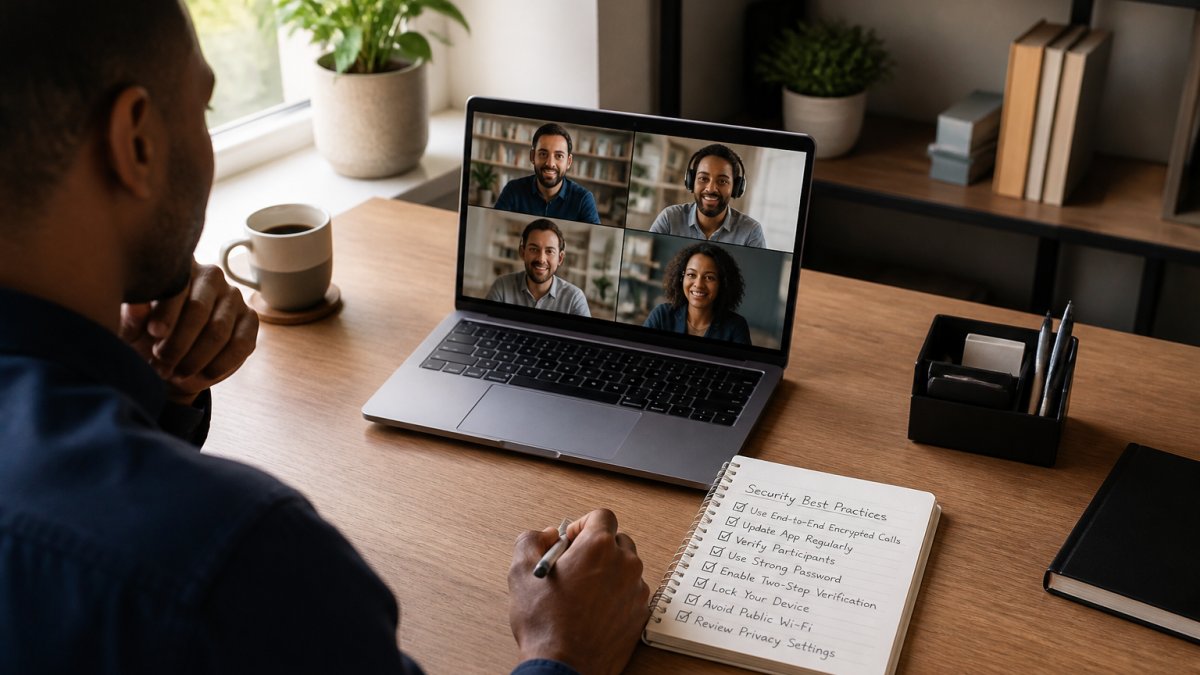
Good video conferencing security best practices come down to a short, repeatable checklist.
Before the call:
- Confirm the app offers end-to-end encryption for the group size you need
- Turn on multi-factor authentication on the account
- Set a waiting room so the host approves each join
During the call:
- Verify key fingerprints with at least one other participant
- Assign host controls so only the host can admit or remove people
- Disable cloud recording and live transcription unless the whole group agrees to lose end-to-end protection
After the call:
- Clear the call log if the app retains metadata you would rather not keep
- Review who still has the meeting link
Access control runs through all of it: encryption protects the stream, access control protects who gets in. You need both.
Choosing the Best Encrypted Group Video Calls for Your Threat Model
The best encrypted group video calls depend on what you are protecting, not a single "most secure" ranking. Match the tool to the threat.
- If you are protecting family calls from casual snooping: end-to-end encryption with verifiable fingerprints is enough. Group size matters more than exotic features.
- If you are a journalist or activist facing a determined adversary: you need end-to-end encryption, minimal metadata retention, open-source clients, and a provider that publishes audits. Group size should stay small.
- If you are a small business handling customer conversations: you need end-to-end encryption plus access control, single sign-on, and a clear retention policy you can explain to clients.
This is where Yonora fits for many of the groups we hear from. It runs on any phone, tablet, or computer with no SIM card required, and supports group calls up to 23 people with privacy by design as the default, covering families spread across countries and small teams that want customer chats and calls in one place.
Conclusion
The hard part is not finding an app that says "encrypted", it is knowing what that word covers for your group size, metadata, and region.
Yonora gives you free HD voice and video calls, group calls up to 23 people, and privacy by design across phones, tablets, and computers, all without a SIM card. Get started free and see how your next group call holds up.
Frequently Asked Questions
Are group video calls end-to-end encrypted?
Not always. One-to-one calls are far more likely to be end-to-end encrypted than group calls, because encrypting a group requires distributing the same encryption keys to every participant. Some apps only encrypt the connection between each person and the server, which means the provider can theoretically access the call. Check the app's own documentation for the specific claim about group calls, not just voice calls, and look for whether the group feature is named explicitly.
How can I tell whether a video calling app uses end-to-end encryption?
Look for three things: a published encryption protocol, an independent security audit, and a visible safety number or verification code inside the app. If the provider claims end-to-end encryption but publishes no protocol details and no audit, treat the claim as marketing until proven otherwise. A verification code you can compare with the other person is the strongest practical signal, because it confirms the encryption keys match on both ends.
Which app is best for encrypted group video calls?
It depends on your threat model. If you need the largest group with the least setup, prioritize participant limits and cross-platform support. If you handle sensitive business conversations, prioritize apps with published audits, self-destructing messages, and host controls like waiting rooms. For families and friend groups, a free plan with reliable audio and video quality usually matters more than enterprise-grade access control. Match the app to what you are actually protecting, not to the longest feature list.
What should I look for in a secure group video calling app?
Check five things before committing: whether group calls are end-to-end encrypted, whether the provider publishes an audit, what metadata it retains and for how long, how many participants the free plan supports, and whether it works on phones, tablets, and computers without a SIM card. Also confirm the app supports multi-factor authentication and lets the host control who joins. These five checks separate apps that are genuinely private from apps that simply say they are.